

Bienvenidos a este Blog en el cual solo se pretende subir información relacionada con el mundo de la aviación y la simulación de vuelo. Se irán subiendo videos, fotos, y noticias con la idea de informar y entretener al usuario en la medida de lo posible, siempre de una forma legal y sin animo de lucro. Sentiros como en casa. *** welcome to my blog, we have the intention to entertain and inform about interesting things related to aviation and simulation. I hope you enjoy!
miércoles, 19 de diciembre de 2012

lunes, 3 de diciembre de 2012
sábado, 1 de diciembre de 2012

miércoles, 17 de octubre de 2012
MANUAL DE VUELO
Muy buen manual de vuelo, de indispensable lectura para los noveles. Solo en castellano. Aqui os paso el
LINK

Flight Plan Creator
You have to see this!!!
*** Flight Plan Creator

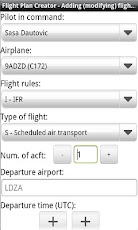
Be mobile! Create, share and archive your flight plans now easier then ever.With this application you can create your flight plan and store it in PDF format on your SD card (external storage).
Flight plan is formed in electronic CA48 format which can be used to file the flight plan without any modifications.
Useful feature is a possibility to predefine pilot and airplane information and use it during flight plan creation process.
Other features:
* view your flight plan in PDF on your mobile device. To use this feature you must have Android PDF reader installed. I suggest you use Adobe Reader which can be downloaded free of charge from Android market.
* share you flight plan using your installed sharing applications. List of possible sharing methods depends on installed applications (Dropbox, email, bluetooth, ...)
* you can access your flight plans from the SD card while the phone is connected to the PC in disk drive mode. Flight plan documents are stored on the SD card (external storage) in the "Flight_Plans" directory.
Note: delete flight plans from the application not from the external storage.
Useful feature is a possibility to predefine pilot and airplane information and use it during flight plan creation process.
Other features:
* view your flight plan in PDF on your mobile device. To use this feature you must have Android PDF reader installed. I suggest you use Adobe Reader which can be downloaded free of charge from Android market.
* share you flight plan using your installed sharing applications. List of possible sharing methods depends on installed applications (Dropbox, email, bluetooth, ...)
* you can access your flight plans from the SD card while the phone is connected to the PC in disk drive mode. Flight plan documents are stored on the SD card (external storage) in the "Flight_Plans" directory.
Note: delete flight plans from the application not from the external storage.
jueves, 27 de septiembre de 2012

lunes, 17 de septiembre de 2012
The Aviation Herald
Parte de incidencias varias en vuelo, muy interesante...
Incidents and News in Aviation. Very interesting...
*** The Aviation Herald

Incidents and News in Aviation. Very interesting...
*** The Aviation Herald

miércoles, 8 de agosto de 2012
Aircraft VOR Free
Aircraft VOR Free
*** HEREEE!!!!
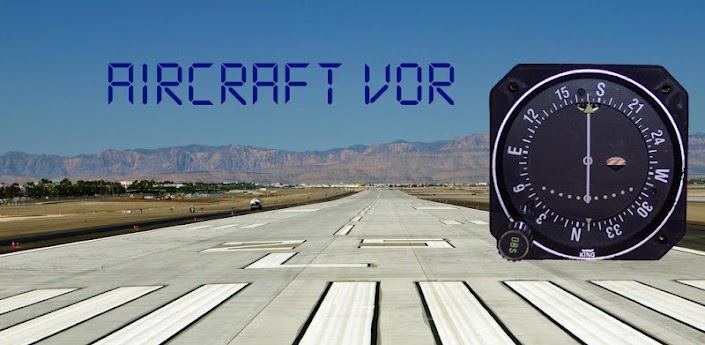
Aircraft VOR provides you with a GPS based aircraft VOR instrument shown as a typical Bendix/King KI-208A instrument.
It lets you 'tune' aircraft navigation Very High Frequency Omni-direction range (VOR) beacons via a worldwide database and allows you to select and track a VOR radial to or from the VOR station.
It also optionally shows you your cross-track deviation in metres.
Features:
- Bendix/King KI-208A face
- Worldwide VOR navigation database (downloaded on first use)
- Digital CRS and distance to station indications
- Option to display cross-track error
- Filtered and smoothed display - no jitter or jumping!
- Support for portrait and landscape screens
- Support for multiple screen resolutions
This is the free version of the app. It is supported by ads and has a five minute time limit. Upgrading to the paid version removes both of these restrictions.
Usage
IMPORTANT POINT 1 - Please ensure you have an active data connection when starting the app for the first time as it will attempt to download the radio navigation database.
Don't use it until you know its working!
Until a GPS fix is obtained, or in case of GPS fix being lost, the VOR on/off indicator will be shown and the distance to station will show ----
Tuning a station
Use the app menu to select 'Tune NAV'. You will be presented with all the VOR stations within 200 nautical miles of your current location. Selecting a VOR will tune it up. Hit your devices 'Back' button when you have selected your desired VOR.
Finding out which radial you currently on
The first thing to remember when trying to find out which radial you are on is that all radials are from the station. The indicator is able to show you which direction to track to the station but this is not directly which radial you are on (it's 180 degrees out). To centre the needle and find the radial you are currently on, rotate the instruments compass card until
the needle centres with a FROM indication.
Finding out your current bearing to the station
Sometimes it is necessary to obtain your current bearing to station. To obtain the bearing from your current position to the station, rotate the instruments compass card until the needle is centred and the TO flag is showing.
Flying a specific radial
Sometimes it is necessary to fly along a specific radial to/from the station. In this case, first select the radial you wish to fly by rotating the instruments compass card to that radial, ensuring the TO/FROM flag is in the correct sense. The VOR needle will then indicate to you which direction you need to move in order to intercept your desired radial. If the needle is to the right, fly right. If it is to the left, fly left. Upon approaching your desired radial, the needle will close into the centre. Each dot indicated on the display is 2 degrees, so the needle will start to move when you are within 10 degrees of the desired radial. You should begin to turn onto a desired course, which matches your radial so that your aircraft heading matches the desired radial when the needle is centred. You will need to compensate for wind appropriately.
Displaying X-Track deviation
You can display you current cross-track error in metres by toggling the menu option. This will show you the number of metres left or right of track when you close to less than 1km of your desired radial
For further information check out http://www.wikihow.com/Navigate-Using-a-VOR
If you like this app, please try my other aircraft/flying related apps!
I'm a professional software engineer, part-time android developer and passionate private pilot so would love to hear your thoughts, feature requests and bug reports
*** HEREEE!!!!
An aircraft navigation VOR receiver for you mobile device!
It lets you 'tune' aircraft navigation Very High Frequency Omni-direction range (VOR) beacons via a worldwide database and allows you to select and track a VOR radial to or from the VOR station.
It also optionally shows you your cross-track deviation in metres.
Features:
- Bendix/King KI-208A face
- Worldwide VOR navigation database (downloaded on first use)
- Digital CRS and distance to station indications
- Option to display cross-track error
- Filtered and smoothed display - no jitter or jumping!
- Support for portrait and landscape screens
- Support for multiple screen resolutions
This is the free version of the app. It is supported by ads and has a five minute time limit. Upgrading to the paid version removes both of these restrictions.
Usage
IMPORTANT POINT 1 - Please ensure you have an active data connection when starting the app for the first time as it will attempt to download the radio navigation database.
Don't use it until you know its working!
Until a GPS fix is obtained, or in case of GPS fix being lost, the VOR on/off indicator will be shown and the distance to station will show ----
Tuning a station
Use the app menu to select 'Tune NAV'. You will be presented with all the VOR stations within 200 nautical miles of your current location. Selecting a VOR will tune it up. Hit your devices 'Back' button when you have selected your desired VOR.
Finding out which radial you currently on
The first thing to remember when trying to find out which radial you are on is that all radials are from the station. The indicator is able to show you which direction to track to the station but this is not directly which radial you are on (it's 180 degrees out). To centre the needle and find the radial you are currently on, rotate the instruments compass card until
the needle centres with a FROM indication.
Finding out your current bearing to the station
Sometimes it is necessary to obtain your current bearing to station. To obtain the bearing from your current position to the station, rotate the instruments compass card until the needle is centred and the TO flag is showing.
Flying a specific radial
Sometimes it is necessary to fly along a specific radial to/from the station. In this case, first select the radial you wish to fly by rotating the instruments compass card to that radial, ensuring the TO/FROM flag is in the correct sense. The VOR needle will then indicate to you which direction you need to move in order to intercept your desired radial. If the needle is to the right, fly right. If it is to the left, fly left. Upon approaching your desired radial, the needle will close into the centre. Each dot indicated on the display is 2 degrees, so the needle will start to move when you are within 10 degrees of the desired radial. You should begin to turn onto a desired course, which matches your radial so that your aircraft heading matches the desired radial when the needle is centred. You will need to compensate for wind appropriately.
Displaying X-Track deviation
You can display you current cross-track error in metres by toggling the menu option. This will show you the number of metres left or right of track when you close to less than 1km of your desired radial
For further information check out http://www.wikihow.com/Navigate-Using-a-VOR
If you like this app, please try my other aircraft/flying related apps!
I'm a professional software engineer, part-time android developer and passionate private pilot so would love to hear your thoughts, feature requests and bug reports
Suscribirse a:
Entradas (Atom)